Building a portfolio website with an AI assistant
Building a Portfolio Website with an AI Assistant
I’ve always noticed something in my career: my best career conversations never happened over a resume alone—they happened when I had a career deck and could show what I built, how I think, and the impact behind it.
During the quiet holiday period, I wanted to work on a small side project to build something with AI or focus on my personal brand.
So, I decided: why not mix both?
I built my own portfolio website, but with a twist: https://seifbassem.com
It includes an AI assistant that takes any job description and generates a personalized summary showing:
- How my skills match the role
- Which projects are most relevant
- And where my experience creates the strongest fit
It started as a “holiday project”, but it ended up becoming the most natural way I’ve ever represented my career.
In this post, I will explain how I built it including:
- 🏗️ Architecture and design trade-offs (Azure free services/tiers without compromising security)
- 📚 AI frameworks, techniques and optimizations (caching, rate limiting, RAG, ..etc)
- 🏭 Automation (CI/CD)
- 🤖 Peer/vibe coding tips (what made me go faster vs slowed me down)
- 💲 How I manage to keep costs under 10$ while not sacrificing security best practices
Architecture
The architecture follows a modern serverless approach with clear separation of concerns between the frontend, backend API, and AI services.
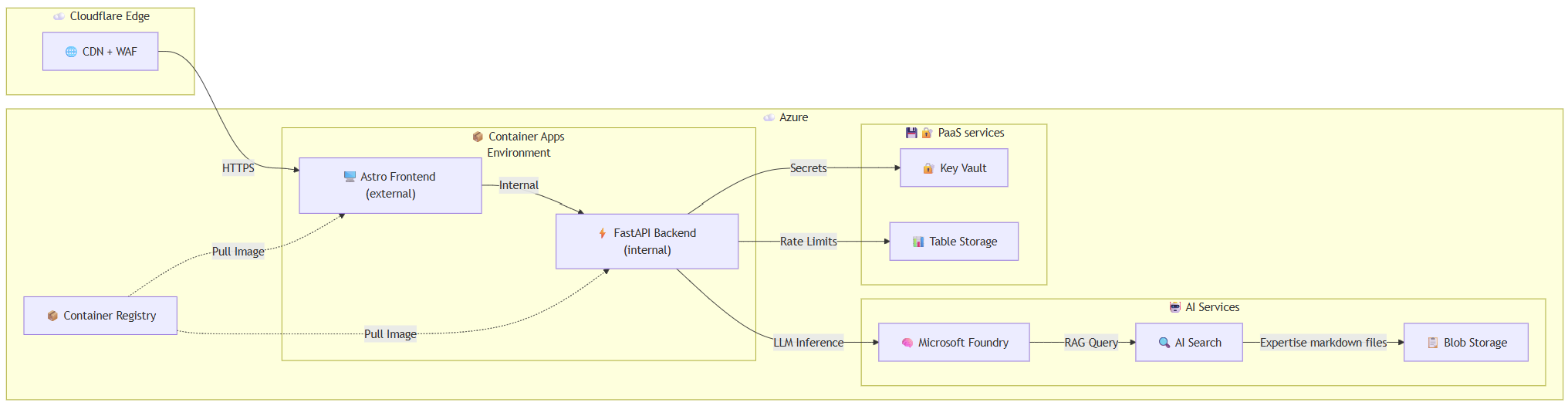
Component Overview
| Component | Purpose | Trade-off |
|---|---|---|
| Cloudflare | CDN, proxy, SSL termination | Free tier provides enterprise-grade edge security |
| Astro Frontend | Front-end using Astro content-driven framework | Allows server-side API routes to proxy requests to the internal backend, keeping it hidden from the internet |
| FastAPI Backend | AI API with streaming responses | Internal-only ingress (not exposed to internet) |
| Azure Container Apps | Hosting frontend and backend services | Scaling to zero to optimize cost and integrate easily with container registry |
| Microsoft Foundry | LLM inference (DeepSeek-V3.2) + Embeddings | Pay-per-token, open-source model provides great value for performance vs cost |
| Azure AI Search | Vector + semantic search for RAG | Free tier provides more than enough capabilities for this project |
| Azure Table Storage | Persistent rate limiting across restarts | Essentially free for low-volume use |
| Key Vault | Secrets management | Standard tier provides low cost given limited operations |
| Container Registry | Storing images for frontend and backend | Basic tier provides low cost for pull/push operations |
Key Trade-offs
- Scale-to-Zero vs Cold Starts: Both container apps scale to zero when idle, saving costs but introducing ~5-10 second cold starts. This is a trade-off I can live with given that this is a portfolio website. A warmup endpoint is used to reduce wait time for the AI assistant endpoint.
- Internal API Ingress: The FastAPI container app backend has
ingressExternal: false, making it only accessible within the Container Apps environment. This eliminates the need for additional API authentication. - DeepSeek vs OpenAI: Using DeepSeek-V3.2 via Microsoft Foundry provides excellent quality at a fraction of GPT costs while maintaining security best practices and guardrails.
- Container Apps Vs Static web apps: Another option was to use Azure Static Web Apps instead of Container apps, the main issue was using a custom backend would force me to use the standard plan which alone costs 9$ per month. This would not allow me to stay within the 10$ goal given the other costs.
- Network security perimeter (NSP): Using private endpoints would require more expensive SKUs for the different Azure services so I decided to use NSP to lock down PaaS services and allow communication between them internally.
- Managed Identity for everything: All PaaS services communicate with each other using managed identities. Local authentication, shared access keys, all are disabled.
Tech Stack
Infrastructure Layer
| Technology | Purpose |
|---|---|
| Bicep | Infrastructure as Code with Azure Verified Modules |
| Github Actions | CI/CD for continuous integration and deployment to Azure using OpenID Connect |
| Azure Container Apps | Serverless container hosting with scale-to-zero |
| Azure Container Registry | Private container image storage (Basic tier) |
| Network Security Perimeter | Zero-trust network isolation for PaaS services |
Frontend Layer
The frontend is built with Astro, a content-driven framework that supports Server-Side Rendering (SSR). It runs as a containerized Node.js application, enabling server-side API routes that proxy requests to the internal backend.
The Docker image is optimized for production using a few key techniques:
- Multi-stage builds: The build process happens in separate stages, so development tools and source code don’t end up in the final image
- Alpine Linux base: A lightweight Linux distribution (~5MB) that keeps the image small
- Production-only dependencies: Only the packages needed to run the app are included
- Non-root user: The container runs as a regular user instead of root for better security
Backend Layer
| Technology | Purpose |
|---|---|
| FastAPI | High-performance async API framework |
| LiteLLM | Unified LLM interface with caching |
| SlowAPI | Rate limiting for API endpoints |
| Python | Runtime with optimization flags |
| Azure Python SDKs | Identity, Search, Tables integration |
This is a containerized FastAPI-based AI assistant API that answers questions about my professional expertise. It combines Retrieval Augmented Generation (RAG) with Azure services to provide intelligent, context-aware responses streamed in real-time. It’s following the same best practices like the frontend to optimize security and image size.
Configuration & Setup
The application loads configuration from environment variables and a YAML file for prompts. It sets up key parameters like cache TTL, rate limits, maximum question length, and search retrieval settings. System prompts for both the assistant and question classification are loaded from an external prompts.yaml file at startup.
Environment variables with critical secrets are stored in Azure Key Vault for better security.
Azure Services Integration
The app authenticates with Azure using DefaultAzureCredential, enabling seamless authentication across local development (Azure CLI) and production (Managed Identity). It connects to three core Azure services:
- Azure AI Search for retrieving relevant portfolio content and expertise
- Microsoft Foundry for generating embeddings and LLM responses
- Azure Table Storage for persistent rate limiting across container restarts
- Azure Key Vault for storing different keys and secrets
- Caching Response caching is handled via LiteLLM’s built-in cache (in-memory by default, with an optional disk cache for persistence). I didn’t use the Azure file share caching option which would provide better caching as it requires using the Storage Account Shared Access Key which I disabled for security reasons.
- Rate Limiting Rate limiting is implemented using SlowAPI to protect the API from abuse. Custom fun messages are returned when users exceed their daily quota.
Two-Stage AI Pipeline
The AI assistant uses a cost-efficient two-stage approach:
- Classification Stage: A lightweight, low-token call determines if the question is relevant to my career/expertise. Off-topic questions are filtered out before expensive RAG processing.
- RAG + Response Stage: For relevant questions, the system generates embeddings, performs hybrid semantic search on Azure AI Search, retrieves relevant document chunks, and streams the LLM response.
Context Retrieval (RAG)
The RAG function implements hybrid search combining keyword matching and vector similarity, enhanced with semantic ranking. It converts the user’s question to an embedding, searches the Azure AI Search index, and returns concatenated document chunks to provide grounded context for the LLM. All my expertise is stored in markdown files in blob storage.
Streaming Responses
Responses are delivered as Server-Sent Events (SSE), enabling word-by-word streaming to the client. This provides a responsive user experience where answers appear progressively rather than all at once. This allows the user experience to be smooth and avoid excessive wait times.
Security & Input Validation
The API includes multiple layers of protection:
- Input sanitization to detect and deflect prompt injection attempts
- Request validation for empty or overly long questions
- IP-based rate limiting to avoid API abuse and unexpected costs for AI tokens
- Non-root user execution (the API runs internally, not exposed externally)
API Endpoints
The application exposes two main endpoints:
- GET /: A simple health check returning service status
- POST /ask: The main endpoint that accepts a question, applies rate limiting, sanitizes input, and streams the AI-generated response. This endpoint is also used to warmup the AI assistant service once the website is loaded
AI services
| Service | Model/SKU | Purpose |
|---|---|---|
| Microsoft Foundry | S0 | Unified AI services account |
| DeepSeek-V3.2 | GlobalStandard | Primary LLM for responses |
| text-embedding-3-small | Standard | Query embeddings for RAG |
| Azure AI Search | Free | Hybrid + semantic search + Semantic ranker |
AI pipeline
RAG Architecture
The AI assistant uses Retrieval-Augmented Generation (RAG) to answer questions grounded in my portfolio content:
User Question → Embedding → Hybrid Search (Keyword + Vector) → Semantic Reranking → LLM with Context
Document Ingestion
Portfolio markdown files are:
- Stored in blob storage
- Chunked into smaller segments
- Embedded using
text-embedding-3-small - Indexed in Azure AI Search with semantic configuration
Retrieval
def retrieve_context(query: str, top_k: int = 5) -> str:
    query_embedding = get_embedding(query)

    results = search_client.search(
        search_text=query,  # Keyword component
        vector_queries=[VectorizedQuery(
            vector=query_embedding,
            k_nearest_neighbors=top_k,
            fields="text_vector"
        )],
        query_type="semantic",  # Enable semantic ranking
        semantic_configuration_name=semantic_config,
    )
    return "\n\n".join([doc["chunk"] for doc in results])
Two-Stage Question Processing
To optimize costs and improve relevance, questions go through two stages:
Stage 1: Classification (~150 tokens)
classification_prompt: |
  Classify if this input is asking ABOUT Seif or his professional work.
  Reply TRUE if asking about experience, skills, job fit, etc.
  Reply FALSE if asking for code, tutorials, or off-topic.
Stage 2: RAG Response (only for relevant questions)
assistant_prompt: |
  You are Seif's AI assistant. Answer using the provided context.
  Include MULTIPLE specific examples (at least 2-3 when available).
  Reference specific projects, contributions, or roles.
Model Selection
| Model | Use Case | Why |
|---|---|---|
| DeepSeek-V3.2 | Main LLM responses | High quality, low cost, fast inference |
| text-embedding-3-small | Query embeddings | Industry standard, good price/performance |
Rate Limiting
Rate limiting is implemented at multiple levels:
- Cloudflare: Provides basic DDOS and security features protection within its free plan
- Application: 3 requests/day per IP using SlowAPI:
@app.post("/ask") @limiter.limit(RATE_LIMIT) async def ask_question(request: Request, question_request: QuestionRequest): - Persistent Storage: Azure Table Storage ensures limits persist across container restarts:
class AzureTableStorage(Storage):
    def _sanitize_key(self, key: str) -> str:
        # Extract IP for consistent rate limiting
        ip_match = re.search(r'(\d{1,3}\.\d{1,3}\.\d{1,3}\.\d{1,3})', key)
        return ip_match.group(1) if ip_match else key
Response Caching
LiteLLM provides built-in caching to avoid redundant LLM calls for identical questions. This is crucial for cost optimization and response latency:
# Cache TTL from environment (default: 1 hour)
CACHE_TTL = int(os.getenv("CACHE_TTL_SECONDS", "3600"))

# In-memory cache for fast repeated responses
litellm.cache = litellm.Cache(type="local", ttl=CACHE_TTL)
litellm.enable_cache()
Caching Trade-offs
| Strategy | Pros | Cons |
|---|---|---|
| In-Memory (current) | Fast, no dependencies | Resets on cold start/restart |
| Disk Cache | Persists across restarts | Requires volume mount, slightly slower. At the time I built this, integration with Azure File Share was available but required the Storage Account shared access key (which I disabled for better security) |
| Redis | Distributed, persistent | Additional cost and complexity |
The architecture supports disk caching via an EmptyDir volume mount:
volumes: [
  {
    name: 'cache-volume'
    storageType: 'EmptyDir'
  }
]
For a low-traffic portfolio site, in-memory caching strikes the right balance—cache hits during active sessions provide instant responses, while cold starts naturally refresh the cache with current data.
Streaming Responses
Responses are streamed using Server-Sent Events (SSE) for real-time user experience:
async def stream_ai_response(question: str) -> AsyncGenerator[str, None]:
    response = await litellm.acompletion(
        model=f"azure/{DEPLOYMENT_NAME}",
        messages=messages,
        stream=True,
    )
    async for chunk in response:
        if chunk.choices[0].delta.content:
            yield sse_message(content=chunk.choices[0].delta.content)
    yield sse_message(done=True)
System Prompt Design
The system prompt is externalized to a YAML file for easy updates without code changes:
assistant_prompt: |
  You are Seif's AI assistant, helping visitors understand his expertise.

  ## Response Guidelines
  - Base answers primarily on provided context
  - Include MULTIPLE specific examples (at least 2-3)
  - Cite concrete metrics and achievements
  - Reference specific projects and contributions
  - Format response in markdown for readability
Security
Despite the low cost, security is not compromised. Here’s how:
Zero-Trust Network Architecture
module nsp 'br/public:avm/res/network/network-security-perimeter:0.1.3' = {
  params: {
    resourceAssociations: [
      { privateLinkResource: keyVault.outputs.resourceId, accessMode: 'Enforced' },
      { privateLinkResource: storageAccount.outputs.resourceId, accessMode: 'Enforced' },
      { privateLinkResource: foundry.outputs.foundryResourceId, accessMode: 'Enforced' }
    ]
  }
}
Network Security Perimeter (NSP) enforces that Key Vault, Storage, and Microsoft Foundry can only be accessed from within the security perimeter, no public internet exposure.
Authentication & Authorization
| Security Feature | Implementation |
|---|---|
| No API Keys | All services use disableLocalAuth: true |
| Managed Identity | User-assigned identity with least-privilege RBAC |
| Key Vault RBAC | Secrets accessed via identity, not access policies |
| TLS 1.2+ | Enforced on all storage and service endpoints |
module storageAccount 'br/public:avm/res/storage/storage-account:0.31.0' = {
  params: {
    allowSharedKeyAccess: false,  // No storage keys
    minimumTlsVersion: 'TLS1_2',
    allowBlobPublicAccess: false
  }
}
Container Security
Both Dockerfiles follow security best practices:
# Non-root user execution
RUN groupadd --gid 1000 appgroup && \
    useradd --uid 1000 --gid appgroup appuser
USER appuser

# Multi-stage builds (no build tools in production)
FROM python:3.12-slim AS runtime
Input Sanitization & Prompt Injection Protection
The backend includes regex-based detection for prompt injection attempts:
SUSPICIOUS_PATTERNS = [
    r"ignore\s+(previous|above|all)\s+instructions?",
    r"disregard\s+(previous|above|all)",
    r"you\s+are\s+now",
    r"system\s*:\s*",
    r"\{\{.*\}\}",  # Template injection
]
Suspicious inputs are logged and deflected with a friendly message rather than processed.
Edge Security via Cloudflare
- WAF Rules: Blocks common attack patterns before reaching Azure
- DDoS Protection: Automatic mitigation at the edge
- SSL Termination: Cloudflare handles certificate management
- Origin Certificates: Mutual TLS between Cloudflare and Azure
Cost
Here’s the breakdown of monthly costs for this architecture:
| Service | SKU | Monthly Cost |
|---|---|---|
| Container Apps (Astro) | Consumption | ~$2-4 (scale-to-zero) Sometimes for managed domain and certificates, there are requests that get send to the app so it scales to 1 in different times through the day |
| Container Apps (API) | Consumption | ~$0-1 (scale-to-zero) |
| Azure AI Search | Free | $0 |
| Microsoft Foundry (DeepSeek) | Pay-per-token | ~$0.08 (light usage) |
| Microsoft Foundry (Embeddings) | Pay-per-token | ~$0.02 |
| Container Registry | Basic | ~$5 |
| Storage Account | Standard LRS, Cold | <$0.01 |
| Key Vault | Standard | <$0.02 |
| Cloudflare | Free tier | $0 |
| Total | ~$8-10/month |
Cost Optimization Strategies
- Scale-to-Zero: Both container apps scale down to zero replicas when idle:
scaleSettings: { maxReplicas: 3, minReplicas: 0, // Scale to zero rules: [{ name: 'http-scaling', http: { metadata: { concurrentRequests: '10' }}}] } - Minimal Container Resources: Each container uses only 0.25 vCPU and 0.5 GB RAM.
- Cold Storage Tier: The storage account uses the Cold access tier since RAG documents are indexed, not frequently accessed.
- In-Memory Caching with Disk Fallback: LiteLLM caches responses to avoid duplicate LLM calls:
litellm.cache = litellm.Cache(type="local", ttl=CACHE_TTL) - Two-Stage Classification: Off-topic questions are rejected with a lightweight LLM call (~10 tokens) before expensive RAG retrieval:
async def classify_question(question: str) -> bool: response = await litellm.acompletion( max_tokens=10, # Minimal tokens for TRUE/FALSE temperature=0, # Deterministic ) - Rate Limiting: 3 questions per day per IP prevents abuse:
RATE_LIMIT = os.getenv("RATE_LIMIT", "3/day")
Networking
Traffic Flow
User → Cloudflare CDN → Azure Container Apps (Astro) → Internal API (FastAPI) → AI Services
- Cloudflare as Reverse Proxy: All traffic first hits Cloudflare, which provides caching, compression, and security filtering.
- Custom Domain with Managed Certificate: The Astro container app has a custom domain binding with a certificate from Key Vault:
customDomains: [{ name: containerAppDomain, bindingType: 'Auto', certificateId: appEnvironment.outputs.appCertResourceId }] - Internal Ingress for API: The FastAPI backend is not exposed to the internet:
ingressExternal: false - Service-to-Service Communication: The Astro frontend proxies API requests internally:
// Astro API route proxies to internal container app const response = await fetch(`${AI_API_URL}/ask`, { headers: { 'X-Forwarded-For': request.headers.get('x-forwarded-for') } }); - Client IP Preservation: The
X-Forwarded-Forheader is forwarded through the proxy chain for accurate rate limiting:def get_client_ip(request: Request) -> str: forwarded = request.headers.get("x-forwarded-for") if forwarded: return forwarded.split(",")[0].strip() return get_remote_address(request)
Network Security Perimeter
The NSP creates a logical boundary around sensitive services, allowing only intra-subscription communication:
profiles: [{
  accessRules: [
    { name: 'inbound', direction: 'Inbound', subscriptions: [{ id: subscription().id }] },
    { name: 'outbound', direction: 'Outbound', fullyQualifiedDomainNames: ['*.search.windows.net'] }
  ]
}]
Vibe/peer coding tips
When building this project, I leaned heavily on GitHub Copilot with Claude Opus 4.5 to help me get up and running quickly on areas where I’m not an expert, specifically with the frontend framework and navigating the different Python libraries. There are a couple of tips that help me go from idea to full project in a couple of days.
- Knowing what you want and having some level of knowledge about the topic can help you get what you need in 1 or more shots. As I have some development background, being explicit on what I need in the frontend made it easier for the model to write the right code quicker.
*Example: I want to have a modal tied to the onClick trigger for that button* - If you are asking it about something relatively new, like Azure Network Security Perimeter, I noticed that it provided wrong answers most of the time, that’s why I recommend for those situations to not rely heavily on LLMs
- I either use the Ask mode or explicitly tell the model to lay out what it’s going to implement before making any changes. Then I can switch to Agent mode for execution. This makes me validate its approach and modify it before it touches any files.
- Always do one change at a time, especially if it’s a big one. I usually break down asks into multiple turns to avoid confusing the model and messing up multiple files at the same time.
- I didn’t know LiteLLM existed, so when I tried to ask it to suggest open-source libraries, it wasn’t one of them. So I found doing my due-diligence first by understanding the landscape and then choosing one to work with, makes things easier
- I found it to hallucinate sometimes when I ask it to implement a specific feature of LiteLLM (which can be expected given there is not a lot of content out there on that). To overcome that, I found it really helpful that I find the right docs, share it and ask explicitly for what I want it to implement. That way, it knew exactly what to do and took minimum shots to get it right.
- It’s very helpful to use it as a reviewer, after bringing everything together, I used it to review my Dockerfiles, Bicep code, Python API for security best practices, optimizations, unnecessary code blocks,…etc. This allows you to have additional eyes on your code, sometimes even different perspectives and paths
Conclusion
Building a production AI assistant for a portfolio doesn’t have to be expensive or insecure. By leveraging:
- Serverless architecture with scale-to-zero
- Managed identity and zero-trust networking
- Cost-effective models open source models
- Smart caching and rate limiting to prevent abuse
…you can create a professional, AI-powered experience for under $10/month.
You can view the code on Github for inspiration.
Have questions about this architecture? Ask my AI assistant! (Just kidding—there’s a rate limit 😉)
Share on:You May Also Like
Level Up your workflows with GitHub Copilot’s custom chat modes
GitHub Copilot has evolved far beyond just completing lines of code — …
CI/CD evaluation of Large Language Models using OpenEvals
Reliability of Large Language Models: Why continuous Evaluation …
Simplifying private deployment of Azure AI services using AVM
I recently worked with a couple of customers on designing an …