 Menu
AI Enrichment with Google Cloud Storage

Table of Contents10
What is Cloud Storage Object Enrichments?
The Google Cloud Storage team has released a very cool feature that lets you attach a declarative configuration to your buckets. Cloud Storage then automatically runs Google’s pre-trained ML models asynchronously against eligible images and PDFs, writing the resulting structured JSON metadata directly onto each object as custom context.
NOTE: No Pub/Sub triggers. No Cloud Run workers. No sidecar metadata store to keep in sync.
Out of the box, Object Enrichments supports five first-party models (all eligible for files ≤ 20 MiB):
- Image labeling (label-detector): Broad entity, scene, and activity labels with confidence scores
- Object detection (object-detector): Localized objects with rectangular bounding polygons
- Face detection (face-detector): Head/face bounding polygons, 36 facial landmarks, head angles (roll/pan/tilt), and expression likelihoods (joy, sorrow, anger, surprise)
- Explicit content (content-safety): Adult and violent content likelihood ratings
- PDF classification (pdf-classification): Standard business/industry categories (e.g., Finance, Taxes, Invoice) and confidence scores
How does it work at a high level?
- Zero LLM tokens: Automatically scans every live upload in-place. It flags unsafe images, distinguishes clean studio packshots (0 faces) from lifestyle model photos (≥1 face), checks bounding-box framing, tags product categories, and catches accidental financial/tax PDFs—all without calling an LLM or incurring token costs.
- SQL Triage (Storage Insights + BigQuery): Cloud Storage automatically exports object contexts into BigQuery. With pure SQL, you join raw enrichment metadata against your other tables to quarantine bad uploads and select only clean, validated shots/documents.
- Selective Gemini via BigQuery AI.GENERATE: Only the clean, passing product URIs ever reach Gemini for tasks that actually require generative capabilities, such as writing SEO descriptions and extracting custom SKU attributes.
Marketplace Catalog AI Enrichment Architecture
Let’s go through a scenario to test this capability end-to-end. I will simulate a multi-merchant marketplace where suppliers and merchants upload hundreds or thousands of product images and documents. For this demo, I’ve created a mix of 8 synthetic product images and 4 PDFs:
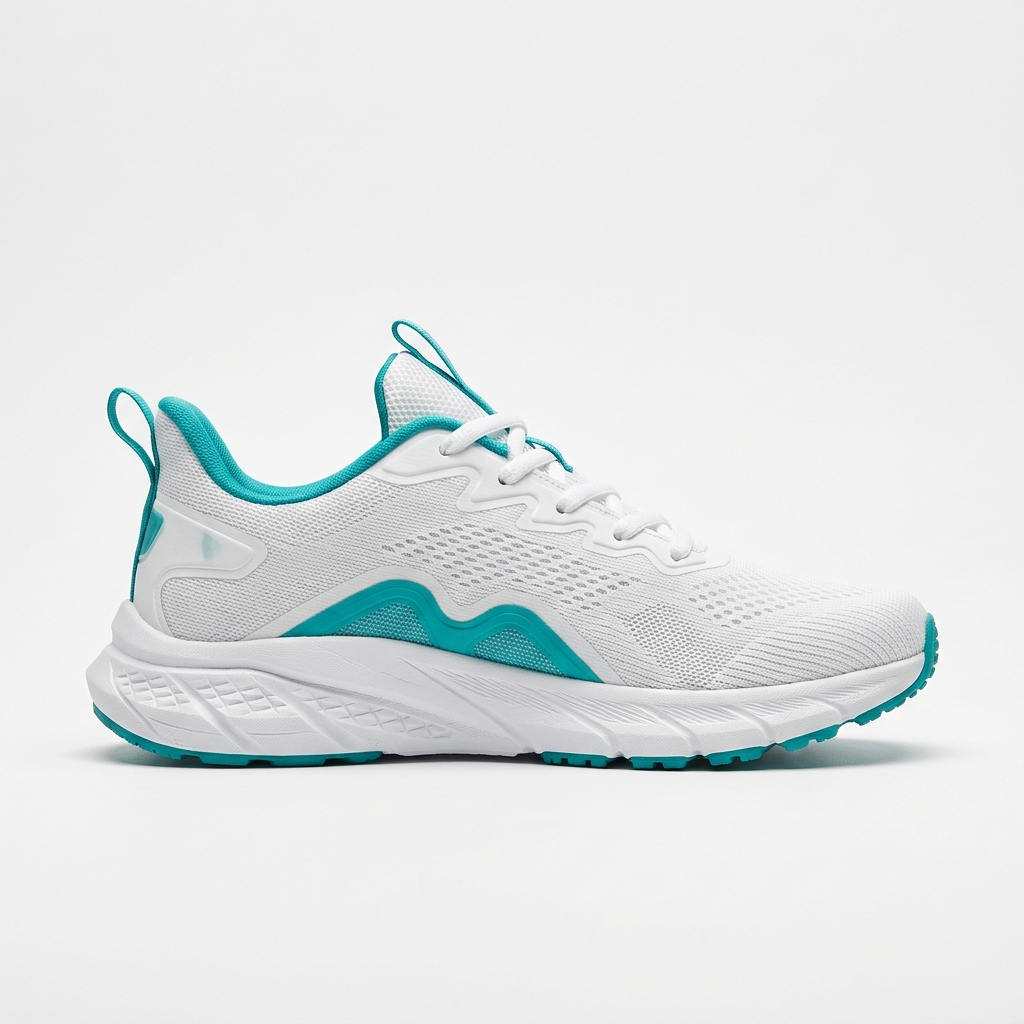
- Studio Packshots (sneaker, travel mug, wireless headphones, leather backpack: 0 faces, clean backgrounds)
- Lifestyle Gallery Shots (smiling runner wearing the sneaker, smiling customer holding the mug: ≥1 face)
- Edge Case (wool beanie intentionally mislisted by the merchant under Electronics)
- PDFs (2 legitimate product spec sheets/manuals + 2 accidental merchant invoice & quarterly tax PDFs)
Sample Uploaded Images
 |
 |
 |
 |
Provisioning the Pipeline with Terraform
What we will need to deploy for this demo:
- A Cloud Storage bucket (obviously!) which will hold our marketplace artifacts
- A
FeatureConfigon top of the bucket. This is the enrichment configuration, like the models we will enable - Storage Intelligence to give us the needed visibility (the bridge that exports our Object Enrichments into BigQuery)
- Gemini platform with Gemini endpoints for further processing if needed
resource "google_storage_control_project_feature_config" "marketplace_enrichment" {
  provider          = google-beta
  project           = var.project_id
  feature_config_id = "marketplace-catalog-enrichment"
  auto_annotate_config {
    processing_location = "us"
    dynamic "models" {
      for_each = [
        "label-detector",
        "object-detector",
        "face-detector",
        "content-safety",
        "pdf-classification",
      ]
      content {
        name = models.value
      }
    }
  }
  filter {
    included_cloud_storage_buckets {
      bucket_id_regexes = [google_storage_bucket.marketplace_catalog.name]
    }
  }
}
Next, authorize the Google-managed service agent service-<PROJECT_NUMBER>@gcp-sa-autoannotate.iam.gserviceaccount.com with roles/storage.annotationGeneratorService on the bucket, roles/storage.bucketViewer on the project, and enable a linked google_storage_insights_dataset_config so enrichments flow straight into BigQuery.
# ------------------------------------------------------------------------------
# Authorize the Object Enrichments Service Agent
# ------------------------------------------------------------------------------
resource "google_storage_bucket_iam_member" "autoannotate_bucket_role" {
  bucket = google_storage_bucket.marketplace_catalog.name
  role   = "roles/storage.annotationGeneratorService"
  member = "serviceAccount:${local.autoannotate_sa_email}"

  # Wait for FeatureConfig creation so the gcp-sa-autoannotate service agent is provisioned
  depends_on = [google_storage_control_project_feature_config.marketplace_enrichment]
}

resource "google_project_iam_member" "autoannotate_project_bucket_viewer" {
  project = var.project_id
  role    = "roles/storage.bucketViewer"
  member  = "serviceAccount:${local.autoannotate_sa_email}"

  depends_on = [google_storage_control_project_feature_config.marketplace_enrichment]
}

# ------------------------------------------------------------------------------
# Storage Insights Dataset -> Linked BigQuery Catalog View
# ------------------------------------------------------------------------------
resource "google_storage_insights_dataset_config" "catalog_insights" {
  project               = var.project_id
  location              = var.region
  dataset_config_id     = var.dataset_config_id
  retention_period_days = var.insights_retention_days
  description           = "Exports marketplace bucket inventory and Object Enrichments to BigQuery."
  link_dataset          = true

  source_projects {
    project_numbers = [data.google_project.current.number]
  }

  identity {
    type = "IDENTITY_TYPE_PER_CONFIG"
  }

  depends_on = [
    google_project_service.apis,
    google_storage_control_project_intelligence_config.project_intelligence,
  ]
}
Uploading Assets & Monitoring Progress
After provisioning the infrastructure, we need to start uploading our assets for the magic to happen.
When uploading objects, always ensure accurate Content-Type headers (image/jpeg, application/pdf) and keep files ≤ 20 MiB, otherwise Object Enrichments silently skips them.
gcloud storage cp --content-type="image/jpeg" \
  ./sample_data/images/prod-001-sneaker-studio.jpg \
  "gs://${BUCKET}/merchants/M-101/products/prod-001-sneaker-studio.jpg"
Because FeatureConfig propagation and initial discovery are asynchronous (documented as up to 24 hours), the best place to watch progress is the Cloud Storage → Object enrichments → Monitoring tab (or Cloud Monitoring metrics under storage.googleapis.com/auto_annotate/operations/pending_objects and model_count).
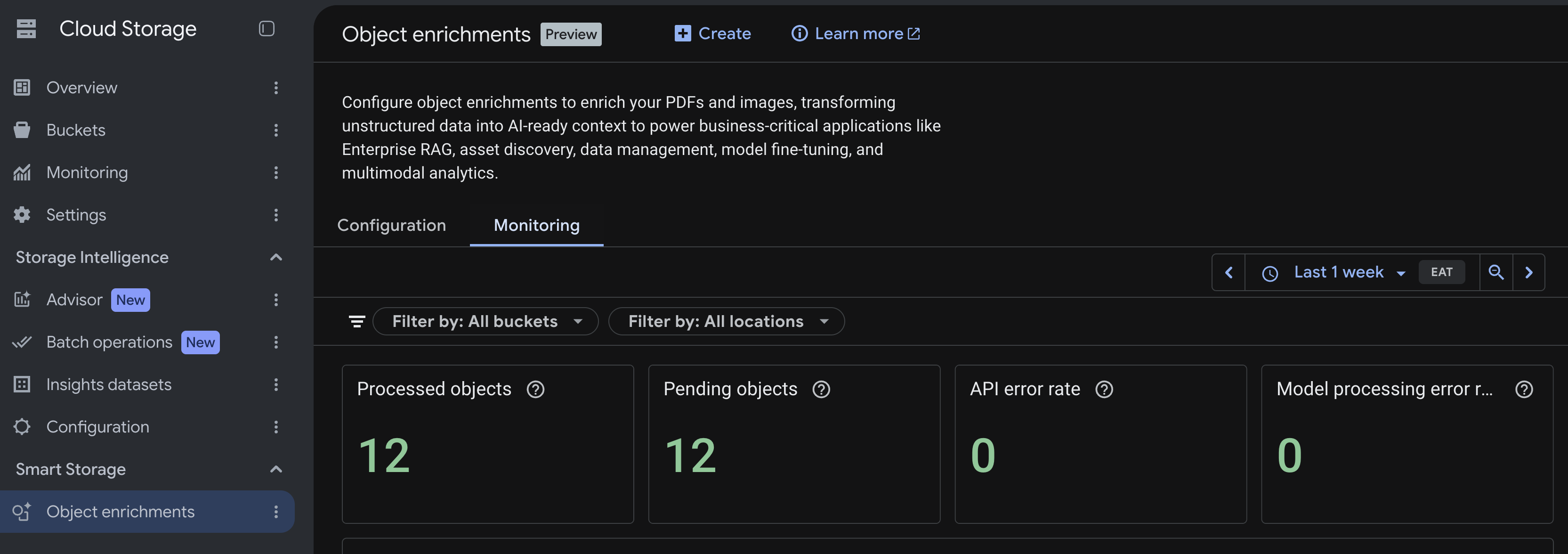
NOTE: In my test run, the new FeatureConfig propagated and discovered all 12 objects in ~4–6 hours:
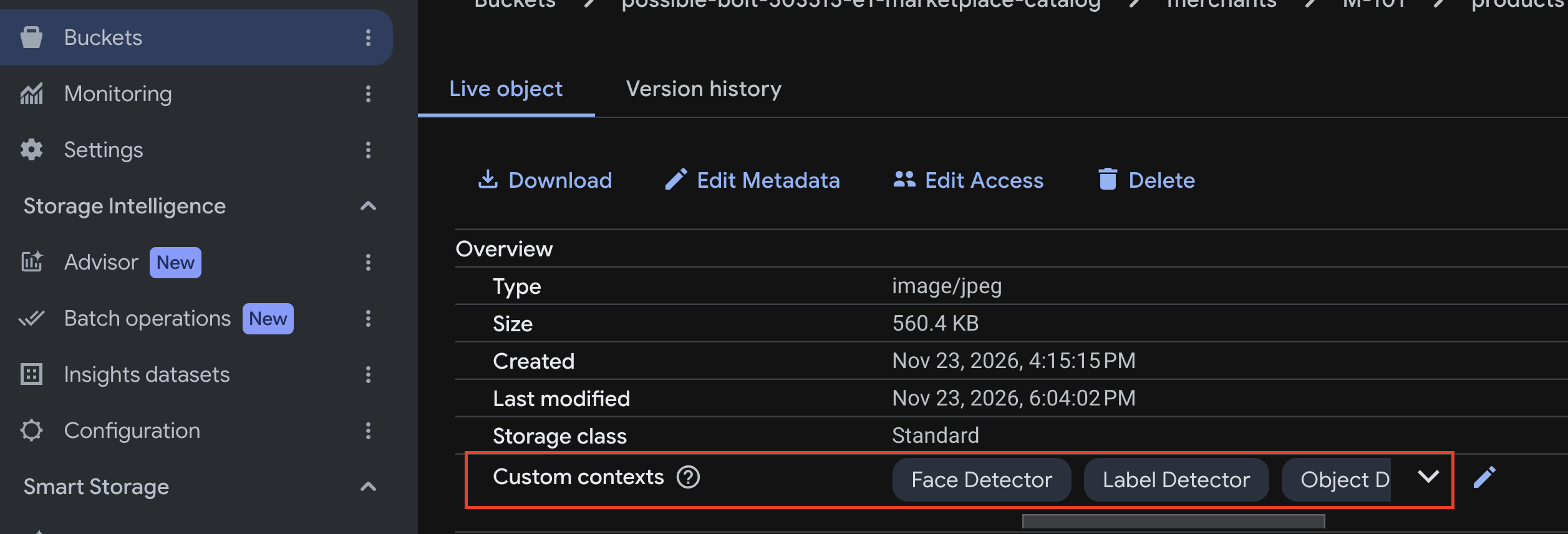
Once processed, you can inspect the full JSON payload on any single object. Here is an example of the live output on our unbranded prod-001-sneaker-studio.jpg:
# Label detection on the unbranded sneaker
curl -s -H "Authorization: Bearer $TOKEN" \
  "$BASE/merchants%2FM-103%2Fproducts%2Fprod-001-sneaker-studio.jpg/viewFullContext?contextKey=google:annotation:label-detector-v1" | jq '.extendedData'
{
"labelAnnotationGroup": {
"labelAnnotations": [
{ "description": "Footwear", "knowledgeGraphId": "/m/09j5n", "score": 0.978, "topicality": 0.031 },
{ "description": "White", "knowledgeGraphId": "/m/083jv", "score": 0.972, "topicality": 0.110 },
{ "description": "Shoe", "knowledgeGraphId": "/m/06rrc", "score": 0.963, "topicality": 0.737 },
{ "description": "Running Shoe", "knowledgeGraphId": "/m/0h8m1sw", "score": 0.959, "topicality": 0.061 },
{ "description": "Nike", "knowledgeGraphId": "/m/0lwkh", "score": 0.956, "topicality": 0.110 },
{ "description": "Sneakers", "knowledgeGraphId": "/m/09kjlm", "score": 0.893, "topicality": 0.796 }
]
},
"modelName": "label-detector",
"modelVersion": "v1"
}We can see the score is high for all shoe-related attributes and it even suggested that it might be a Nike. Let’s try another use case where a supplier uploaded a beanie product under Electronics.
curl -s -H "Authorization: Bearer $TOKEN" \
  "$BASE/merchants%2FM-103%2Fproducts%2Fprod-005-beanie-misclassified.jpg/viewFullContext?contextKey=google:annotation:label-detector-v1" | jq .
{
"extendedData": {
"labelAnnotationGroup": {
"labelAnnotations": [
{
"description": "Apparel and fashion accessory",
"knowledgeGraphId": "/j/fmyrry",
"score": 0.815444,
"topicality": 0.00002152395
},
{
"description": "Woolen",
"knowledgeGraphId": "/m/01yh65",
"score": 0.7944378,
"topicality": 0.029377697
},
{
"description": "Wool",
"knowledgeGraphId": "/m/09kxp",
"score": 0.7701011,
"topicality": 0.084000446
},
{
"description": "Knit cap",
"knowledgeGraphId": "/m/021_yc",
"score": 0.6826022,
"topicality": 0.4819946
},
{
"description": "Beanie",
"knowledgeGraphId": "/m/02gw_5",
"score": 0.60850155,
"topicality": 0.48945478
},
{
"description": "Multicolor",
"knowledgeGraphId": "/a/fbwxsx",
"score": 0.6058401,
"topicality": 0.0002638567
},
{
"description": "Stylish",
"knowledgeGraphId": "/a/265n39",
"score": 0.44023335
},
{
"description": "Woven fabric",
"knowledgeGraphId": "/m/01s_83",
"score": 0.30426398,
"topicality": 0.0012540178
}
]
},
"modelName": "label-detector",
"modelVersion": "v1"
}
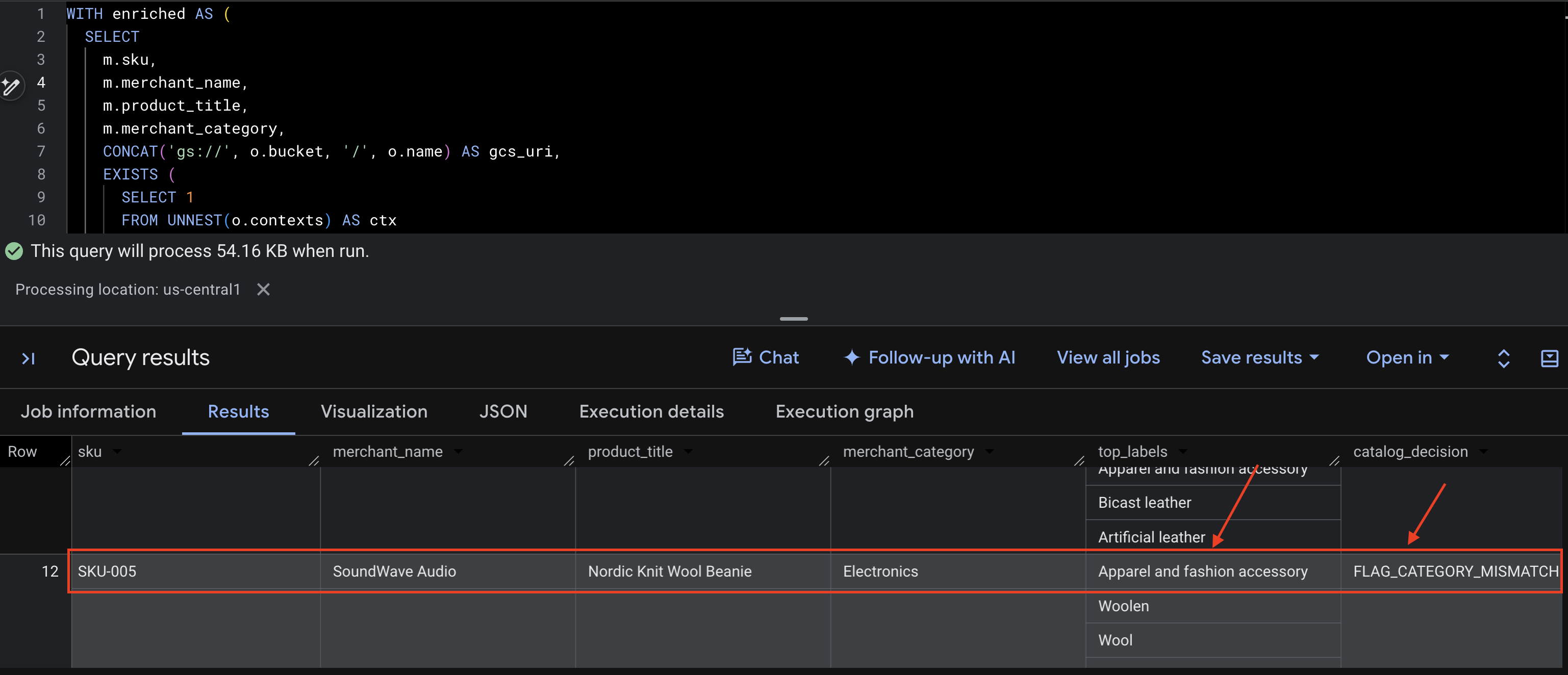
}As soon as the image lands in Cloud Storage, label-detector-v1 tags it in-place with “Apparel and fashion accessory” (0.815), “Woolen” (0.794), “Wool” (0.770), “Knit cap” (0.683), and “Beanie” (0.609), with zero Electronics labels.
Catalog Triage in BigQuery
Once Storage Insights syncs the bucket metadata into BigQuery, every object’s enrichment JSON is queryable in object_contexts_catalog_view. Joining it with our merchant_listings table gives us instant catalog quality assurance using only SQL.
WITH enriched AS (
  SELECT
    m.sku,
    m.merchant_name,
    m.product_title,
    m.merchant_category,
    CONCAT('gs://', o.bucket, '/', o.name) AS gcs_uri,
    EXISTS (
      SELECT 1
      FROM UNNEST(o.contexts) AS ctx
      WHERE ctx.key = 'google:annotation:face-detector-v1'
        AND ctx.value = 'SUCCESS'
        AND ARRAY_LENGTH(JSON_QUERY_ARRAY(ctx.extendedData, '$.faceAnnotationGroup.faceAnnotations')) > 0
    ) AS has_human_face,
    (
      SELECT ARRAY_AGG(JSON_VALUE(lbl, '$.description') ORDER BY CAST(JSON_VALUE(lbl, '$.score') AS FLOAT64) DESC LIMIT 8)
      FROM UNNEST(o.contexts) AS ctx,
        UNNEST(JSON_QUERY_ARRAY(ctx.extendedData, '$.labelAnnotationGroup.labelAnnotations')) AS lbl
      WHERE ctx.key = 'google:annotation:label-detector-v1'
        AND ctx.value = 'SUCCESS'
        AND CAST(JSON_VALUE(lbl, '$.score') AS FLOAT64) >= 0.60
    ) AS top_labels
  FROM `<project_id>.marketplace_catalog_ai.merchant_listings` AS m
  LEFT JOIN `<project_id>.marketplace_catalog_insights_f83e3efa_9395_4802_bf83_ca0cf1d906b7.object_contexts_catalog_view` AS o
    ON o.bucket = '<project_id>-marketplace-catalog'
    AND o.name = m.object_path
)
SELECT
  sku,
  merchant_name,
  product_title,
  merchant_category,
  top_labels,
  CASE
    WHEN top_labels IS NULL THEN 'PENDING_INSIGHTS_SYNC'
    WHEN merchant_category = 'Electronics'
      AND EXISTS (SELECT 1 FROM UNNEST(top_labels) AS l WHERE LOWER(l) IN ('apparel and fashion accessory', 'beanie', 'knit cap', 'wool', 'woolen'))
      THEN 'FLAG_CATEGORY_MISMATCH'
    WHEN has_human_face THEN 'LIFESTYLE_GALLERY'
    ELSE 'HERO_PACKSHOT'
  END AS catalog_decision
FROM enriched
ORDER BY sku;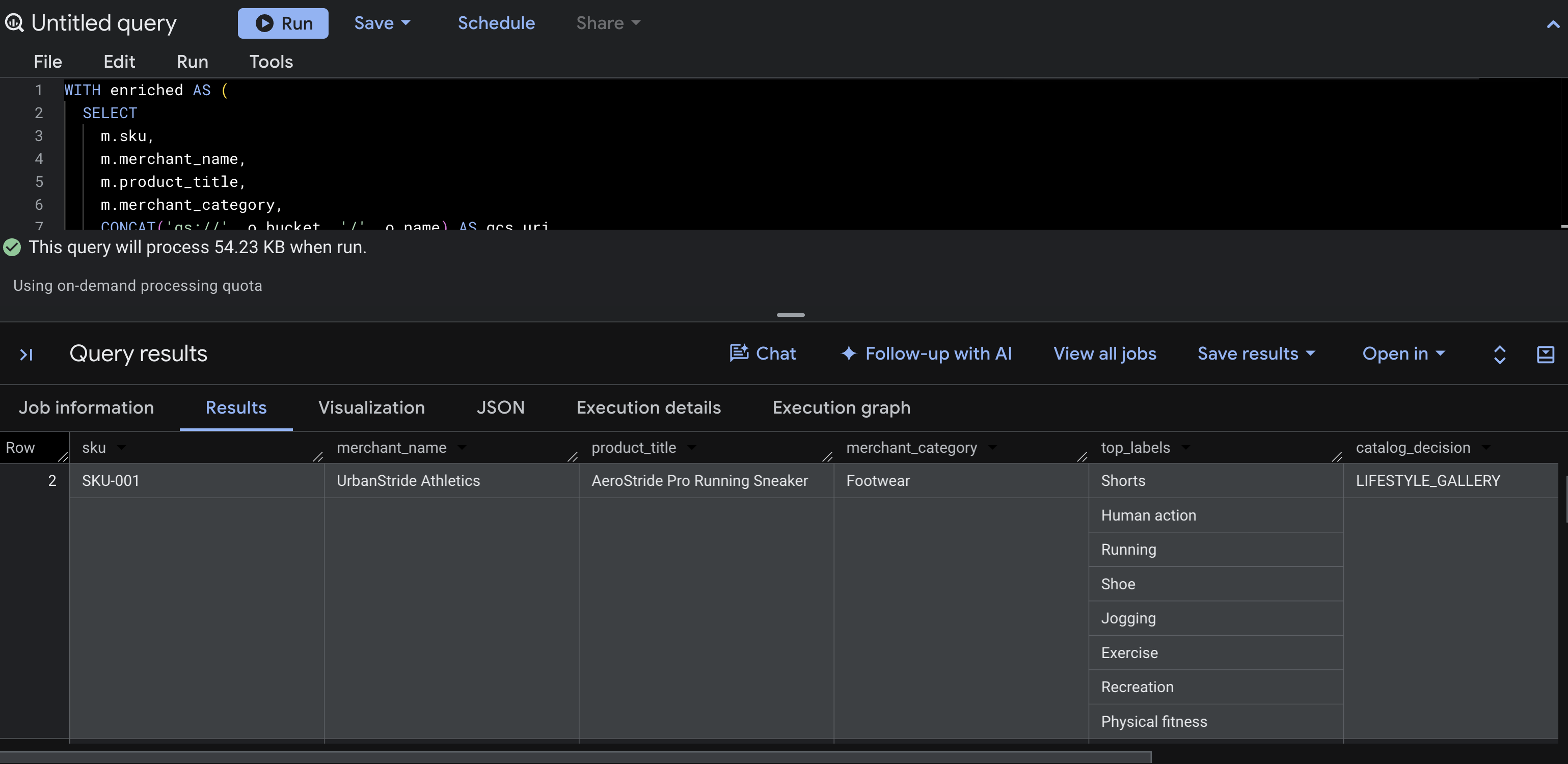
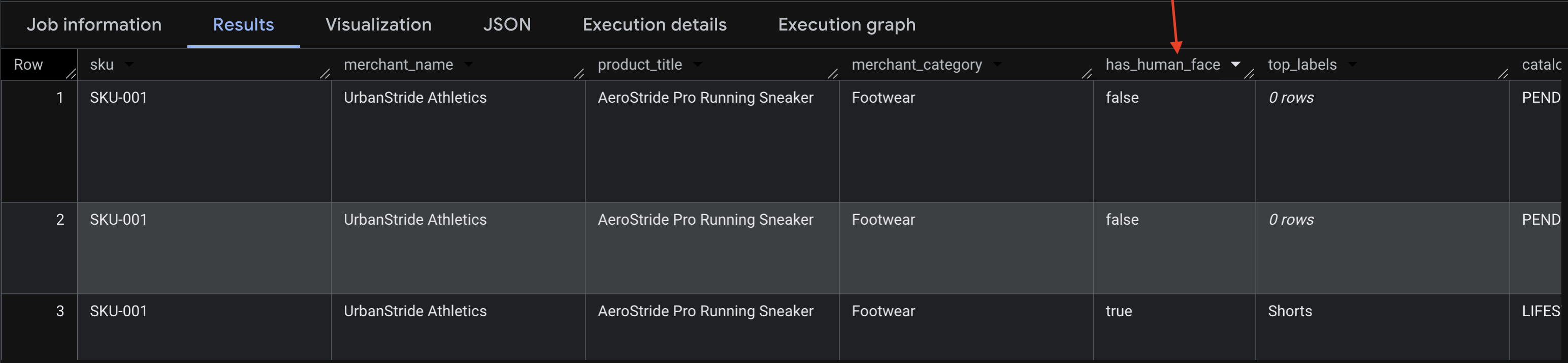
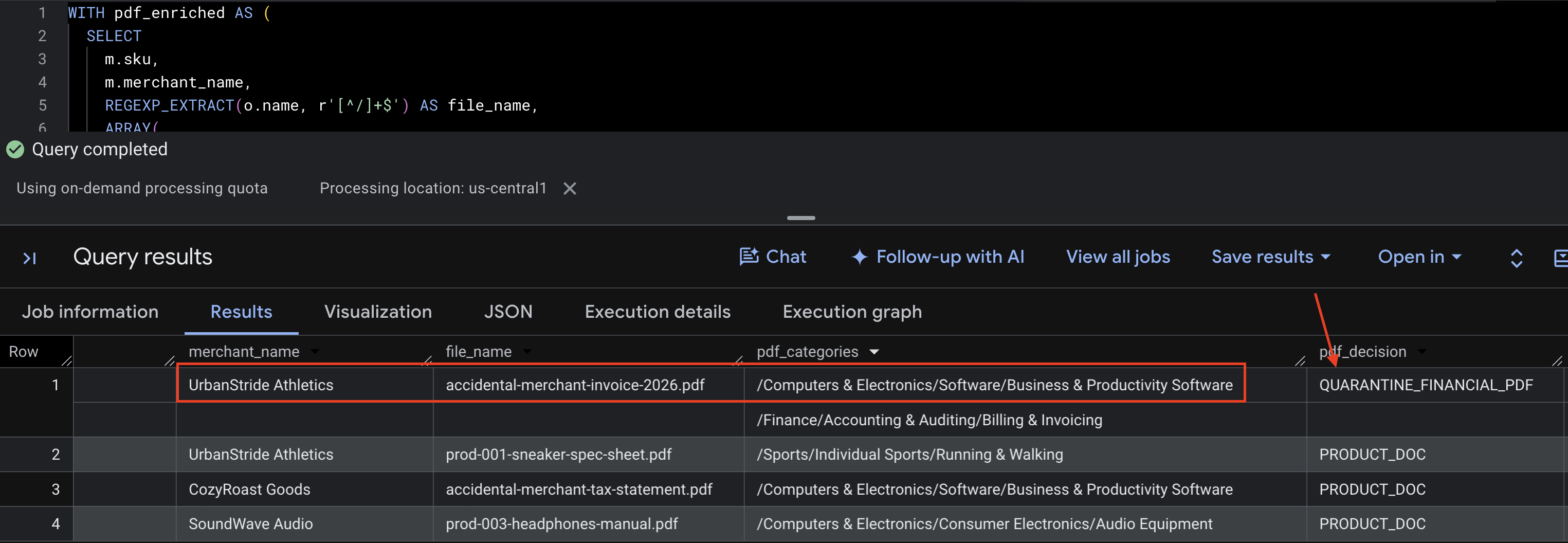
In one query, the marketplace automatically:
- Separates Hero Packshots (
has_human_face = FALSE) from Lifestyle Gallery photos (has_human_face = TRUE). - Flags SKU-005 where
merchant_category = 'Electronics'clashes withlabel-detectorreturning knitwear/hat labels. - Isolates the two accidental merchant invoice and tax PDFs via
google:annotation:pdf-classification-v1.
Selective Gemini Enrichment + cost comparison
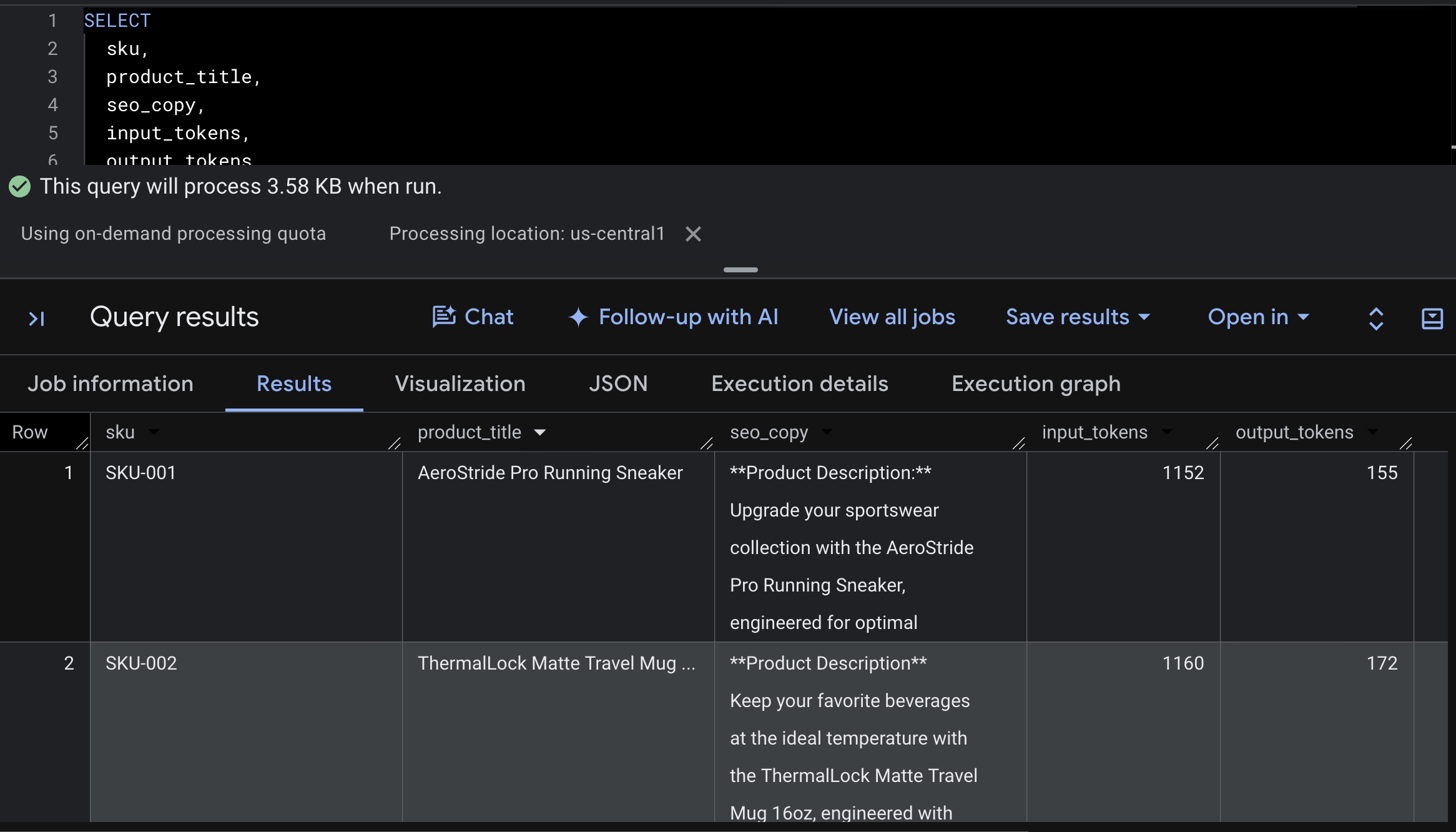
Instead of calling Gemini on all objects, we create a BigQuery Object Table over the bucket and invoke AI.GENERATE only on the 4 validated products, injecting the verified GCS labels right into the prompt and pulling exact token counts from full_response.usageMetadata:
SELECT
  sku,
  product_title,
  gen.result AS seo_copy,
  CAST(JSON_VALUE(gen.full_response, '$.usageMetadata.promptTokenCount') AS INT64) AS input_tokens,
  CAST(JSON_VALUE(gen.full_response, '$.usageMetadata.candidatesTokenCount') AS INT64) AS output_tokens
FROM (
  SELECT
    t.sku,
    t.product_title,
    AI.GENERATE(
      (
        CONCAT('Write a 2-sentence SEO description using tags (', ARRAY_TO_STRING(t.top_labels, ', '), ') for: ', t.product_title),
        obj.ref
      ),
      connection_id => '<project_id>.us-central1.vertex-ai-gemini-conn',
      endpoint => 'gemini-3.8-flash'
    ) AS gen
  FROM `<project_id>.marketplace_catalog_ai.v_catalog_triage` AS t
  JOIN `<project_id>.marketplace_catalog_ai.product_media_objects` AS obj
    ON obj.uri = t.gcs_uri
  WHERE t.catalog_decision = 'HERO_PACKSHOT'
);
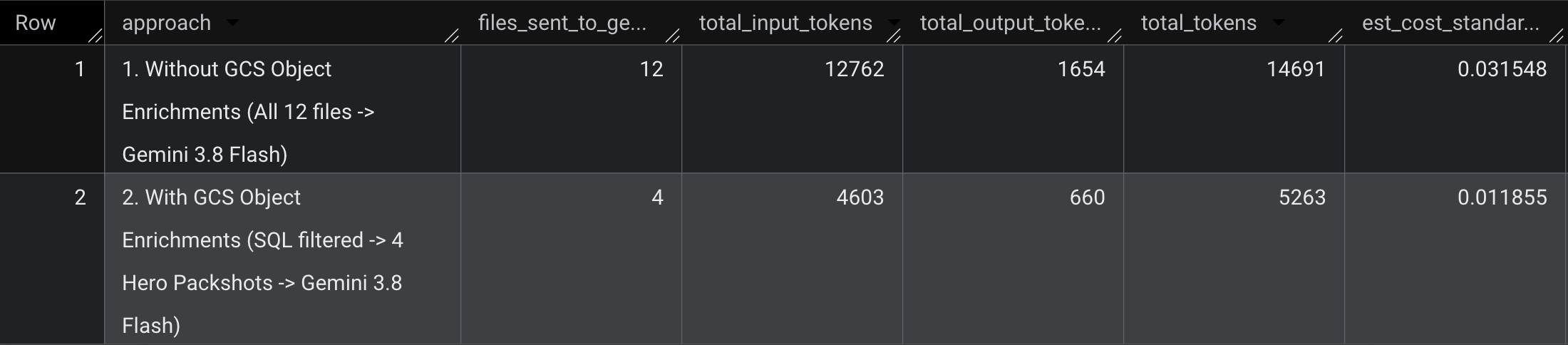
To measure the real impact, I ran a baseline benchmark performing the exact same marketplace audit and SEO copy generation without GCS Object Enrichments, sending all 12 raw files (8 images + 4 PDFs) straight to gemini-3.8-flash with a single “do-everything” prompt:
-- Gemini must audit, classify, and filter all 12 raw uploads itself
AI.GENERATE(
  (
    CONCAT(
      'You are an e-commerce catalog auditor and editor. Inspect this uploaded file for product "',
      m.product_title, '" (merchant category: "', m.merchant_category, '"). ',
      '1) Check content safety. ',
      '2) Classify as: HERO_PACKSHOT (clean studio shot, no faces), LIFESTYLE_GALLERY (contains face), ',
      'QA_FLAG_CLUTTERED, QA_FLAG_CATEGORY_MISMATCH, PRODUCT_DOC, or QUARANTINE_FINANCIAL_PDF. ',
      '3) ONLY if HERO_PACKSHOT, write a 2-sentence SEO description and 3 bullet highlights.'
    ),
    obj.ref
  ),
  connection_id => '<project_id>.us-central1.vertex-ai-gemini-conn',
  endpoint => 'gemini-3.8-flash'
) AS gen
Using gemini-3.8-flash Standard list pricing, here are the BigQuery results:
Trade-offs: When Not to Use Object Enrichments
Because Object Enrichments runs asynchronously, configuration updates and initial enrichment can take up to 24 hours to propagate. Use it for batch or background workflows where immediate, real-time classification isn’t required.